This page has moved and will no longer be updated. To access the current page, click the Online Help  icon in PrismHR or navigate to the new help docs site and search for your topic.
Accessing Time Off Plan Setup and Enrollment Forms
The following forms display in the Time Off Dashboard after selecting Time Off Plan Setup and Enrollment on the Work Centers Quick Access panel:
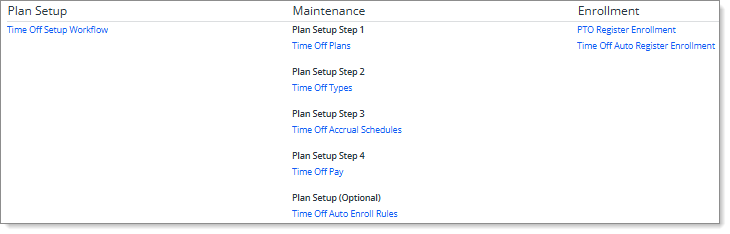
Accessing Forms
The Time Off Plan Setup and Enrollment Center provides convenient access to the forms required to perform the following functions:
Plan Setup
|
•
|
Time Off Setup Workflow: Use the Time Off Setup Workflow form in the Time Off Setup Workflow process to continue setting up in-progress time off plans or create new time off plans. (See Setting Up Time Off Plans.) |
Note: The Time Off Setup Workflow form is only available for service providers. For more information about the Time Off Setup Workflow process, see Using the Time Off Setup Workflow Process.
Maintenance
|
•
|
Time Off Plans (Plan Setup Step 1): Use the PTO Benefit Plan form to define PTO benefit plans that determine employee paid time off accruals. (See Defining Time Off Plans.) |
|
•
|
Time Off Types (Plan Setup Step 2): Use the PTO Classes form to restrict the number of register types that can be assigned to an employee to avoid employee PTO register duplication. (See Defining Time Off Types.) |
Enrollment
Note: If you do not have access to a form in the Time Off Plan Setup and Enrollment Center, it does not display in the list.
To access the Time Off Plan Setup and Enrollment Center:
|
•
|
On the Work Centers panel, click Time Off Plan Setup and Enrollment. |
|
•
|
Select the form you want to access. (You can still access the forms by entering the form name in the Search menu or selecting it from the regular menus.) |
To get detailed instructions for using the open form:
|
•
|
Click  (Help) in the header area. (Help) in the header area. |
To return to the Time Off Plan Setup and Enrollment page:
|
•
|
Click  in the header area of the form. (Note: This option does not display on the Time Off Auto Register Enrollment form.) in the header area of the form. (Note: This option does not display on the Time Off Auto Register Enrollment form.) |
