This page has moved and will no longer be updated. To access the current page, click the Online Help  icon in PrismHR or navigate to the new help docs site and search for your topic.
Recalculating PTO Accruals
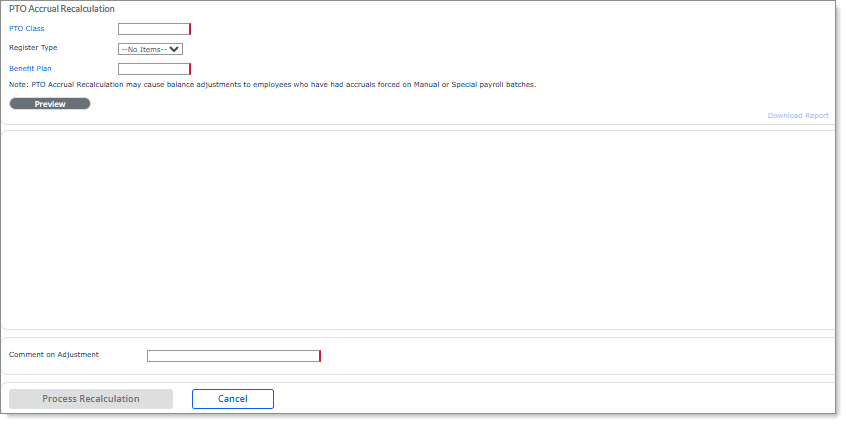
You can use the PTO Accrual Recalculation form to recalculate PTO accruals for the selected PTO Class, Register Type, and PTO Benefit Plan for the current plan year. (The date range automatically adjusts for each employee based on the year-end date in their register.)
Important! The PTO Accrual Recalculation form does not work with Global PTO.
The PTO Accrual Recalculation form is helpful in case the initial setup was incorrect or you need to make a bulk adjustment. However, you must first update the PTO benefit plan/register for a PTO recalculation to appear. For example:
Note: This feature is only available for service providers.
Important! At this time, a note displays stating that using the accrual recalculation tool might adversely impact employees who have forced PTO accrual on manual or special batches is a preparatory warning. The system functionality to force PTO accruals on manual or special payrolls will be included in a future release.
To recalculate PTO accruals:
|
1.
|
Enter or select the PTO Class. |
|
2.
|
Select the Register Type. |
|
3.
|
Enter or select the Benefit Plan. |
|
4.
|
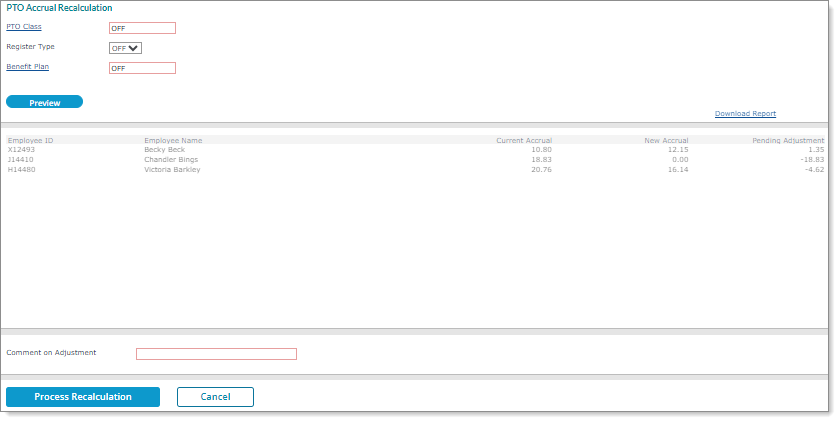
Select Preview. The system processes the PTO registers for that client, register type, and PTO benefit plan for the current plan year. (The date range automatically adjusts for each employee based on the year-end date in their register.) For example: |
|
5.
|
Enter a Comment on Adjustment that will display on the PTO adjustment. |
|
6.
|
Click Process Recalculation. A window opens that displays the processing steps. |
|
7.
|
Click Close. A message displays, "Update Completed." Click OK to continue. |
|
8.
|
Click Download Report to view the PTO accrual recalculation details on-screen. (You can save the file by clicking XLS.) The report displays on-screen. (You can also select Download Report to save this report.) |
Note the following:
|
•
|
Each employee has one written absence journal where the system writes the actual PTO register once with the adjustment amount. |
|
•
|
You can update accruals in the current plan year, but cannot close out the plan year or reset the YTD hours taken. |
|
•
|
This process does not include carryover hours. |
|
•
|
The adjustment effective date is based on the recalculation date. |
|
•
|
Users whose role is set to INQUIRY for the PTO Accrual Recalculation form cannot access this form. |
