 icon in
 Creating W-2 Election Text
Set up the Early W‑2 Election page in Employee Portal (EP) with the W‑2 Election Configuration form. This lets employees access W-2s electronically and saves money on printing and mailing costs. Employees also receive their W-2s earlier than a form sent by mail. For example:
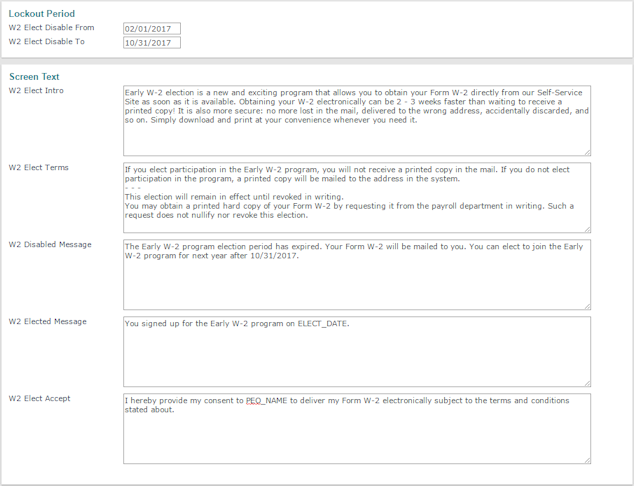
Note: The PEO_NAME substitution variable resolves to the client's legal name in all sections.
To set up the Early W-2 Election page:
| 1. | Complete these fields as required. |
| Field | Description |
|---|---|
| Lockout Period | Period during which employees are unable to access their W-2s. Set W2 Elect Disable From and W2 Elect Disable To to set this lockout period. Outside of these dates, employees are able to access the Early W-2 Election page. |
| W2 Elect Intro | Displays text in the Introduction field. |
| W2 Elect Terms | Displays terms to help employees understand how to use the page. |
| W2 Disabled Message | Displays when the page is not available. |
| W2 Elected Message | Displays when employees return to the page after electing to receive W-2s electronically. |
| W2 Elect Accept | Statement that displays above the Click Here to Accept check box on the page. This implies that an employee agrees with the terms and conditions established by your organization. |
| 2. | Click Save. |
