 icon in
 Creating and Updating OSHA Case Files
Use the OSHA Cases form to create and update Occupational Safety & Health Administration (OSHA) case files for work-related injuries or illnesses.
OSHA Case
The first panel establishes basic information for the OSHA case file.
To set up or modify an OSHA case:
| 1. | Click New Case to create a new OSHA case file, or enter the Case Number of an existing case file. |
| 2. | Enter the Employee by either entering the name, Social Security Number, or ID to display a pop-up list of matching employee records. You can also click the field label or press Ctrl+Enter with your cursor in this field to open the search window. |
| 3. | If this case involves privacy concerns, select the Privacy Case? option. If this field is selected, the OSHA 300 Log will display the employee name as "Privacy Case". |
| 4. | Enter the employee's Position. The default comes from the Employee Details; do not enter the activity in which the employee was engaged. |
| 5. | Enter the code for home Department code in which the employee worked when the injury occurred or at the onset of the illness. The default comes from the Employee Details. |
| 6. | Enter the Location code where the injury or illness occurred. The description displays. |
| 7. | Modify the fields in the panels listed below, as necessary. |
| 8. | Click Save. |
Injury/Illness
Use the Injury/Illness panel to describe what happened in the OSHA case.
|
Field |
Description |
|---|---|
|
Date of Injury or Onset of Illness |
Date when the employee sustained the injury or first reported the symptoms. |
|
OSHA Event Code for Injury/Illness |
Enter the event code that best describes the injury or illness. |
|
Report Incident on the 300A log |
Select this option if the client recorded the injury or illness in the OSHA 300A log. |
|
Description of Injury/Illness |
Enter a description. Be as explicit as possible. |
|
Description of where accident occurred |
This is an optional field and is limited to 15 characters. |
Claim
The Claim panel provides additional OSHA claim information.
|
Field |
Description |
|||||||||
|---|---|---|---|---|---|---|---|---|---|---|
|
Date Notified |
Date when the employee notified their supervisor about the injury or illness. |
|||||||||
|
Fatal |
Select one of the following options:
|
|||||||||
|
Expired On |
If you select Yes above, enter the date of the expiration of the claim to ensure reporting on the OSHA 300A Report. |
|||||||||
|
Claim Filed |
Select one of the following options:
|
|||||||||
|
Days Away |
Number of days away from work as a result of the injury or illness. |
|||||||||
|
Days Restricted |
Number of days the employee has restricted work duties. |
|||||||||
|
Medical Cost |
Total estimated medical cost associated with the illness or injury. Enter 0 if there is no estimate or if it does not apply to this case. |
|||||||||
|
Labor Cost |
Enter the total labor cost due to this illness or injury. Enter 0 if there is no estimate or if it does not apply to this case. |
OSHA Form 101 Detail
Enter detailed information as required in the OSHA Form 101 Detail panel.
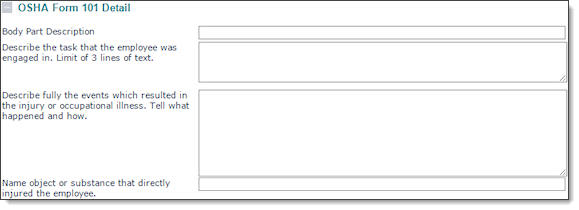
To fill out information for OSHA Form 101:
| 1. | Enter the Body Part Description. This describes what was affected by the injury or illness. |
| 2. | Describe the task in which the employee was engaged. |
| 3. | Describe in detail the events that resulted in the injury or illness. |
| 4. | Name the object or substance that affected the employee. For example: |
| • | The machine or other object that struck the employee, or which he or she struck |
| • | The vapor or poison the employee inhaled or swallowed |
| • | The chemical or radiation that irritated the skin |
| • | The object that the employee lifted or pulled |
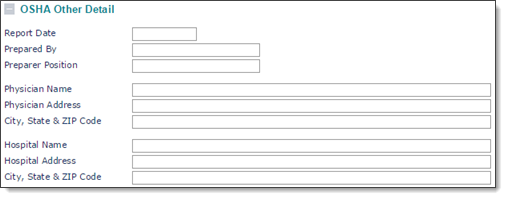
OSHA Other Detail
Enter other information in the OSHA Other Detail panel, as required.
|
Field |
Description |
|---|---|
|
Report Date |
Date when the report was prepared. |
|
Prepared By |
Person who prepared the report. |
|
Preparer Position |
Job title of the person who prepared the report. |
|
Physician Name |
Name of the physician who treated the employee for the injury or illness. |
|
Physician Address |
Street address for the physician. |
|
City, State, & ZIP code |
Location of the physician. |
|
Hospital Name |
Name of the hospital where the employee received treatment for the injury or illness. |
|
Hospital Address |
Street address of the hospital. |
|
City, State & ZIP Code |
Hospital location. |
