 icon in
 Using the Dashboard
The PrismHRDashboard provides quick access to company information and relevant features. The information shown in the Chart and List sections of the Perspective panel reflects the client selected.
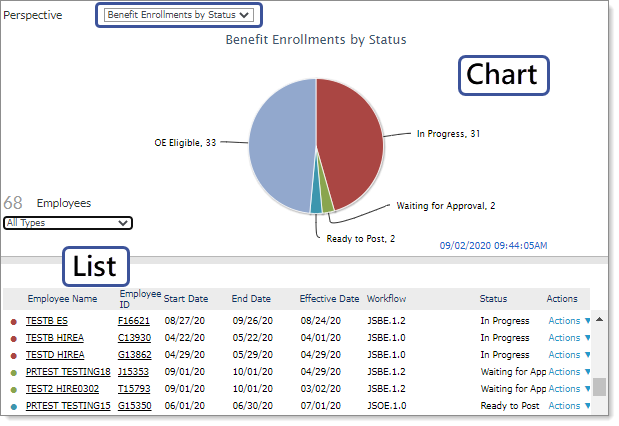
To view onboarding tasks within Benefits Enrollment, in the Chart section of the Perspective panel, select Benefit Enrollments by Status from the list.
Displaying Tasks and Their Status
The chart in the Perspective panel displays enrollment tasks and their statuses. You can use the type list to filter the type of enrollment to view in the Dashboard (All Types, Benefit Enrollment Only, Open Enrollment Only, Life Event Only, Anytime Enrollment Only). When you select an enrollment type, the system displays the number of employee enrollments available.
| Status | Description | ||||||||||||
|---|---|---|---|---|---|---|---|---|---|---|---|---|---|
|
In Progress |
The employee has either not started, or has started but not yet completed the enrollment. |
||||||||||||
|
Waiting for Approval |
The employee has submitted the enrollment, and the enrollment is awaiting approval. |
||||||||||||
|
Ready to Review |
The employee's enrollment is approved, and in the posting queue. At this point, the enrollment might be included or not yet included in a batch. |
||||||||||||
|
Ready to Post |
The employee's enrollment is in a batch, has passed review, and is ready to post. |
||||||||||||
| Post/Review Failure | The employee's enrollment is in a batch, but has either not passed review or failed to post. | ||||||||||||
| OE Eligible |
Employees included in this status are eligible for open enrollment. OE eligibility is determined as follows:
|
Displaying Benefit Enrollments by Type
The List section displays the individual benefit enrollment records for the type selected. You can further filter benefit enrollment records that display in the list by clicking a status in the pie chart. The list updates, and the colored dot that displays next to each item matches the color in the pie chart section.
The table displays the following columns.
| Column | Description | ||||||||||||
|---|---|---|---|---|---|---|---|---|---|---|---|---|---|
| Employee Name | The employee's name. | ||||||||||||
| Employee ID | The employee's ID. | ||||||||||||
| Start Date | The start date for the enrollment workflow. | ||||||||||||
| End Date | The end date for the enrollment workflow. | ||||||||||||
| Effective Date | The enrollment effective date. | ||||||||||||
| Workflow | The name of the enrollment workflow. | ||||||||||||
| Status |
The status for the enrollment. |
||||||||||||
| Actions |
An action to perform for a specific enrollment record. The following options are available:
|
